Sign-in sheet layouts
Choose a layout to load it above. Each one is a single page of US Letter paper with a numbered line for each employee, a column for the hours and a line for the supervisor to sign. With 10 lines, each line is taller and a notes box fills the rest of the page.
How to use a daily sign-in sheet
- Print one sheet for each day, or for each shift or location. Type the company and the date above before you print, or leave them blank and write them in.
- Keep the sheet and a pen where people start work, next to a clock everyone can see.
- When they start, each employee writes their full name and the time in, as the clock shows it, and signs their line.
- On a sheet with lunch columns, each person writes when they leave for an unpaid meal break and when they come back.
- At the end of the shift, each person writes the time out.
- A supervisor works out each line's hours, checks the sheet, signs it at the bottom and passes it to payroll.
If a time is wrong, cross it out with a single line and write the right time next to it with initials, so the sheet still shows what changed. To add up each person's week, copy their days onto a weekly time card or into the time card calculator.
A filled-in sign-in sheet
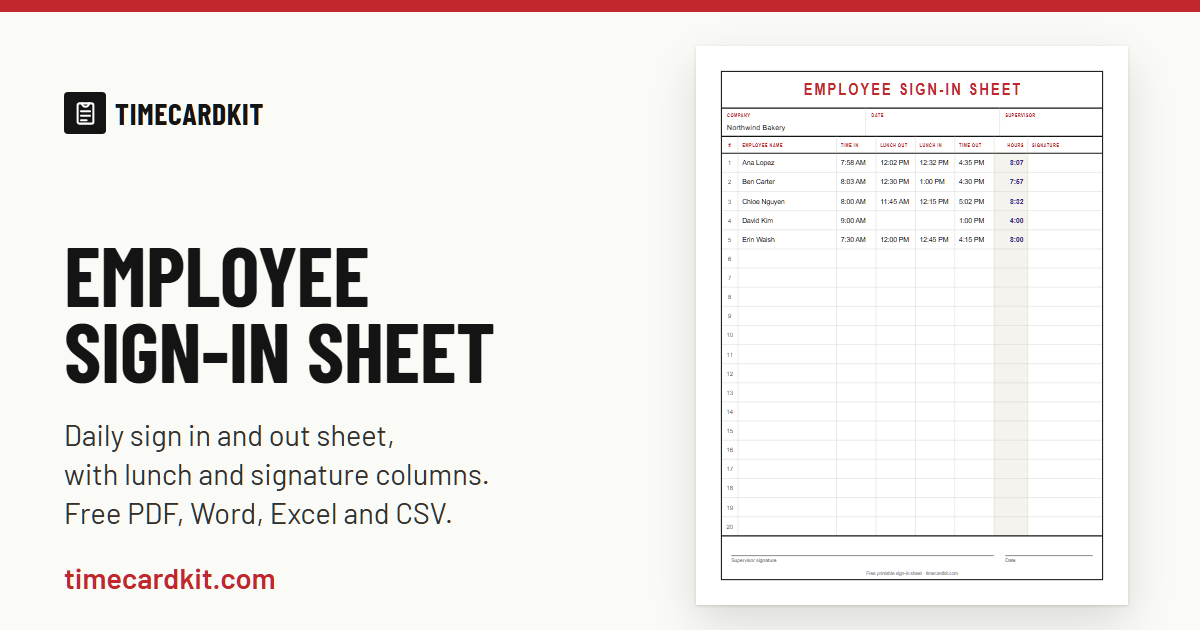
Five people on one day, on a sheet with lunch columns. Each line's hours are the time out minus the time in, minus the time between lunch out and lunch in, the same math as our calculators:
| Employee | In | Lunch | Out | Hours |
|---|---|---|---|---|
| Ana Lopez | 7:58 AM | 12:02–12:32 PM | 4:35 PM | 8:07 |
| Ben Carter | 8:03 AM | 12:30–1:00 PM | 4:30 PM | 7:57 |
| Chloe Nguyen | 8:00 AM | 11:45 AM–12:15 PM | 5:02 PM | 8:32 |
| David Kim | 9:00 AM | No lunch | 1:00 PM | 4:00 |
| Erin Walsh | 7:30 AM | 12:00–12:45 PM | 4:15 PM | 8:00 |
Ana Lopez's line, worked out.
- Before lunch
- 12:02 PM − 7:58 AM = 4:04
- After lunch
- 4:35 PM − 12:32 PM = 4:03
- Unpaid lunch
- 0:30, not counted
- Hours
- 8:07 (8.12)
What to record
Federal rules don't prescribe a form for time records: "No particular order or form of records is prescribed" (29 CFR 516.1). What matters is what the records hold. For each employee covered by the federal minimum wage and overtime rules, employers keep these items, among others:
From the federal recordkeeping rule, 29 CFR 516.2(a)
- Name in full
- (a)(1)
- Hours worked each workday
- (a)(7)
- Total hours worked each workweek
- (a)(7)
The same paragraph defines a workday as "any fixed period of 24 consecutive hours" and a workweek as "any fixed and regularly recurring period of 7 consecutive workdays". A daily sign-in sheet with each person's full name and hours covers the hours worked each workday. For the weekly total, add each person's days for the workweek, on a time card or in payroll. The pay rate, wages and deductions go in the payroll records.
Employers may use any timekeeping method they choose, such as a time clock, a timekeeper, or workers who write in their own times, as long as the record is complete and accurate. Source: DOL Fact Sheet #21.
Rounding, early arrivals and breaks
Rounding. Federal rules accept recording starting and stopping times "to the nearest 5 minutes, or to the nearest one-tenth or quarter of an hour", as long as, over time, employees are still paid for all the time they actually work (29 CFR 785.48(b)). Write the times as the clock shows them, and round when you work out the hours if your employer's policy rounds. See rounding time punches.
Early and late. For time clocks, the federal rules say that employees who voluntarily come in before their regular starting time, or stay after their closing time, don't have to be paid for that time as long as they do no work in it (29 CFR 785.48(a)). Time spent working counts as hours worked, whatever the sheet says.
Breaks. Use the lunch columns only for unpaid meal breaks. Rest breaks of about 5 to 20 minutes count as hours worked, while a bona fide meal period, ordinarily 30 minutes or more with no duties, does not. Sources: 29 CFR 785.18 and 785.19. Some states require meal or rest breaks; see lunch break laws by state.
How long to keep sign-in sheets
| Record | Keep at least | Federal rule |
|---|---|---|
| Time cards and sheets with each day's starting and stopping times | 2 years | 29 CFR 516.6 |
| Payroll records | 3 years | 29 CFR 516.5 |
The 2-year rule covers "all basic time and earning cards or sheets on which are entered the daily starting and stopping time of individual employees", counted from the date of the last entry, and payroll records are kept 3 years from the last entry. Keep the sheets safe and accessible at the workplace or at a central records office, where the Department of Labor's Wage and Hour Division can inspect them (29 CFR 516.7). Some states require longer.
PDF, Excel, Word and CSV
Drawn in your browser at the exact size of US Letter, 8.5 × 11 inches. Print it at 100% or Actual size so the lines keep their height.
Word
The same sheet as a Word document: one table on one page. Change a heading or add your logo, then print it. It opens in Google Docs too.
Excel
Type the times, like 8:00 AM or 17:30, and each line's hours and the total for the day add up by themselves, lunch taken off.
CSV
The columns and numbered lines as plain text with commas, for payroll software or any spreadsheet.
Sends the preview to your printer. To keep a copy, choose Save as PDF as the printer.
The sheet and every file are made in your browser, and nothing you type is uploaded. The company name and your choices stay in this browser for next time.
Sign-in sheet or time card?
A sign-in sheet is one page per day for everyone on a shift, so a supervisor can see who came in and when. A time card is one employee's record for a week or two, with the daily hours added into the weekly total that overtime depends on: under federal law each workweek stands alone (29 CFR 778.104). Many employers use both. People sign in each day, and payroll moves each person's lines onto a weekly time card template or into the time card calculator, which counts the overtime.
Questions
What is an employee sign in sheet?
A page where employees write their name and the times they start and stop work, usually one page per day for everyone on a shift, with each person signing their own line. It is also called a staff sign-in sheet or a sign in and out sheet. It is a simple way to keep the record of hours worked each workday that federal rules require for hourly employees (29 CFR 516.2(a)(7)).
What should be on an employee sign in sheet?
The company and the date at the top; a line for each person with the full name, time in, time out and hours; lunch out and lunch in if people take unpaid meal breaks; a column to sign; and a line for the supervisor who checks it. The federal rule asks for each employee's name in full and the hours worked each workday (29 CFR 516.2(a)).
Is there an employee sign in sheet template for Excel or Word?
Yes. Excel downloads the sheet with formulas that add up each line's hours and the day's total. Word downloads it as a .docx document, one table on one page. In Google Sheets or Google Docs, upload the file to Google Drive and open it there.
Is there an employee sign in sheet with lunch?
Yes. Tick Lunch out and in above, or choose the With lunch layout. Each line then has columns for leaving and coming back from an unpaid meal break, and the Excel file takes that time off the hours.
What is a daily employee sign in and out sheet?
The same sheet: one page for one day, where each person signs in when they arrive and out when they leave. For one employee's whole week on a single page, use the time card template instead.
How long do you keep employee sign in sheets?
At least 2 years from the last entry under federal rules, for time sheets that show each day's starting and stopping times (29 CFR 516.6), and 3 years for payroll records (29 CFR 516.5). Some states require longer.
Do employees have to sign in and out?
Federal law doesn't require a sign-in sheet or any particular method. Employers may use a time clock, a timekeeper, or workers who write their own times, but they must keep accurate records of the hours worked each workday and each workweek. Your employer's policy decides how you record your time. Sources: DOL Fact Sheet #21 and 29 CFR 516.1.
Can a sign in sheet replace a time card?
It records each day. Overtime is decided week by week, so someone still adds each person's days for the workweek, on a time card or in payroll. The time card calculator does that, including overtime over 40 hours.
Is this sign in sheet free?
Yes. Download, print and copy as many sheets as you need, for any business. There is no sign-up and no watermark; a small line at the bottom says where the sheet came from.